Plot Tide Range
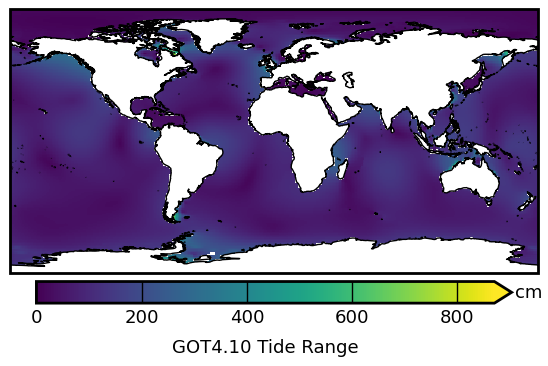
This notebook demonstrates plotting the difference between the Highest Astronomical Tide (HAT) and Lowest Astronomical Tide (LAT) to get an estimate of the total tide range.
Important
Need to download tide model prior to running this notebook.
OTIS format tidal solutions provided by Oregon State University and ESR
Global Tide Model (GOT) solutions provided by Richard Ray at GSFC
Finite Element Solution (FES) provided by AVISO
Python Dependencies
Program Dependencies
io.model.py: retrieves tide model parameters for named tide modelsio.OTIS.py: extract tidal harmonic constants from OTIS tide modelsio.ATLAS.py: extract tidal harmonic constants from ATLAS netcdf modelsio.GOT.py: extract tidal harmonic constants from GOT tide modelsio.FES.py: extract tidal harmonic constants from FES tide models
Note
This notebook uses Jupyter widgets to set parameters for calculating the tidal maps.
Load modules
import numpy as np
import xarray as xr
import matplotlib
import datetime

matplotlib.rcParams["axes.linewidth"] = 2.0
import matplotlib.pyplot as plt
import matplotlib.colors as colors
import cartopy.crs as ccrs
import ipywidgets

# import tide programs
import pyTMD.io
import pyTMD.tools
import timescale

# autoreload
%load_ext autoreload
%autoreload 2
Set parameters for program
Model directory
Tide model
# available model list
model_list = sorted(pyTMD.io.model.ocean_elevation())
# display widgets for setting directory and model
TMDwidgets = pyTMD.tools.widgets()
TMDwidgets.model.options = model_list
TMDwidgets.model.value = "GOT4.10_nc"
# create dropdown with calculation method
TMDwidgets.method = ipywidgets.Dropdown(
    options=["Approximate", "Calculated"],
    value="Approximate",
    description="Method:",
    disabled=False,
    style=TMDwidgets.style,
)
# start of 20-year epoch
TMDwidgets.datepick.description = "Epoch:"
TMDwidgets.datepick.value = datetime.datetime(2020, 1, 1)
TMDwidgets.VBox(
    [
        TMDwidgets.directory,
        TMDwidgets.model,
        TMDwidgets.method,
        TMDwidgets.datepick,
    ]
)
Read tide model
# get model parameters
model = pyTMD.io.model(
    TMDwidgets.directory.value,
).from_database(TMDwidgets.model.value)
# open dataset and convert to centimeters
ds = model.open_dataset(group="z", chunks="auto")
ds = ds.tmd.to_units("cm")
Setup coordinates for calculating tides
# create a global image
xlimits = [-180, 180]
ylimits = [-90, 90]
spacing = [1.0, 1.0]
# x and y coordinates
x = np.arange(xlimits[0], xlimits[1] + spacing[0], spacing[0])
y = np.arange(ylimits[0], ylimits[1] + spacing[1], spacing[1])
xgrid, ygrid = np.meshgrid(x, y)
# create xarray DataArrays for coordinates in crs of model
X, Y = ds.tmd.coords_as(xgrid, ygrid, type="grid", crs=4326)
Calculate tide range map
def get_peaks(ds, time=None, corrections=None):
    """
    Get the peak-to-peak range of a tidal time series
    """
    # calculate tides for date range
    tpred = ds.tmd.predict(time, corrections=corrections)
    # infer minor constituents and add to prediction
    tpred += ds.tmd.infer(time, corrections=corrections)
    # calculate tidal range as difference between astronomical high and low
    peak_to_peak = tpred.max(dim="time") - tpred.min(dim="time")
    return peak_to_peak
# interpolate model to grid points
ds1 = ds.tmd.interp(X, Y, extrapolate=False)
# model constituents
cons = ds1.tmd.constituents
# calculate peak-to-peak tide range
if TMDwidgets.method.value == "Approximate":
    # interpolate minor constituents to get a more complete tidal range
    ds1 = ds1.tmd.minor_admittances(corrections=model.corrections)
    # calculate worst case tide range (constructive interference of all)
    darr = ds1.tmd.to_dataarray()
    # use the worst case as an approximation of the peak-to-peak range
    worst_case = np.abs(darr).sum(dim="constituent", skipna=False)
    peak_to_peak = worst_case.compute()
else:
    # rechunk to smaller chunks for parallel computation
    ds1 = ds1.chunk({"x": 5, "y": 5})
    # create template for the output
    template = ds1[cons[0]]
    # use a time span greater than 18.6 year nodal cycle
    ts = timescale.from_datetime(TMDwidgets.datepick.value)
    # 20-year time span at hourly increments
    hours = np.arange(24 * 365.25 * 20)
    time = ts.tide + hours / 24.0
    # calculate peak-to-peak tide range
    peak_to_peak = xr.map_blocks(
        get_peaks,
        ds1,
        kwargs=dict(time=time, corrections=model.corrections),
        template=template,
    ).compute()
Create plots of tidal range
# cartopy transform for Equirectangular Projection
projection = ccrs.PlateCarree()
# create figure axis
fig, ax = plt.subplots(
    num=1, figsize=(5.5, 3.5), subplot_kw=dict(projection=projection)
)
# plot peak-to-peak tide range
sc = peak_to_peak.plot(
    ax=ax,
    vmin=0,
    add_colorbar=False,
    add_labels=False,
    transform=projection,
)
# add moderate resolution cartopy coastlines
ax.coastlines("50m")

# Add colorbar and adjust size
# pad = distance from main plot axis
# extend = add extension triangles to upper and lower bounds
# options: neither, both, min, max
# shrink = percent size of colorbar
# aspect = lengthXwidth aspect of colorbar
cbar = plt.colorbar(
    sc,
    ax=ax,
    extend="max",
    extendfrac=0.0375,
    orientation="horizontal",
    pad=0.025,
    shrink=0.90,
    aspect=22,
    drawedges=False,
)
# rasterized colorbar to remove lines
cbar.solids.set_rasterized(True)
# Add label to the colorbar
longname = f"{model.name} Tide Range"
cbar.ax.set_title(longname, fontsize=13, rotation=0, y=-2.0, va="top")
cbar.ax.set_xlabel("cm", fontsize=13, rotation=0, va="center")
cbar.ax.xaxis.set_label_coords(1.075, 0.5)
# ticks lines all the way across
cbar.ax.tick_params(
    which="both", width=1, length=16, labelsize=13, direction="in"
)

# axis = equal
ax.set_aspect("equal", adjustable="box")
# set x and y limits
ax.set_xlim(xlimits)
ax.set_ylim(ylimits)

# no ticks on the x and y axes
ax.get_xaxis().set_ticks([])
ax.get_yaxis().set_ticks([])
# stronger linewidth on frame
ax.spines["geo"].set_linewidth(2.0)
ax.spines["geo"].set_capstyle("projecting")

# adjust subplot within figure
fig.subplots_adjust(left=0.02, right=0.98, bottom=0.05, top=0.98)
# show the plot
plt.show()
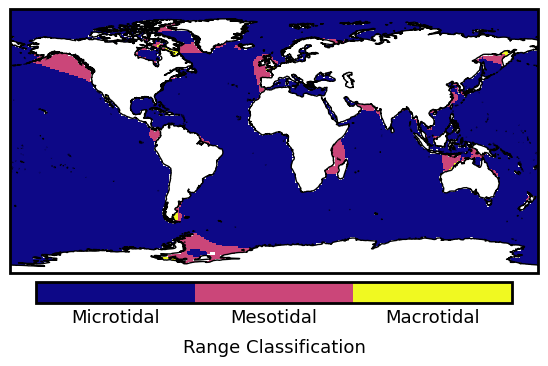
Create plots of range classifications
# tide classifications
boundary = np.array([0.0, 200.0, 400.0, 2000.0])
ticklabels = ["Microtidal", "Mesotidal", "Macrotidal"]
longname = "Range Classification"
# calculate ticks for labels
ticks = 0.5 * (boundary[1:] + boundary[:-1])

# create figure axis
fig, ax = plt.subplots(
    num=2, figsize=(5.5, 3.5), subplot_kw=dict(projection=projection)
)
# create boundary norm
norm = colors.BoundaryNorm(boundary, ncolors=256)
# plot tide range classification
extent = (xlimits[0], xlimits[1], ylimits[0], ylimits[1])
sc = peak_to_peak.plot(
    ax=ax,
    add_colorbar=False,
    add_labels=False,
    norm=norm,
    cmap="plasma",
    transform=projection,
)
# add moderate resolution cartopy coastlines
ax.coastlines("50m")

# Add colorbar and adjust size
# pad = distance from main plot axis
# extend = add extension triangles to upper and lower bounds
# options: neither, both, min, max
# shrink = percent size of colorbar
# aspect = lengthXwidth aspect of colorbar
cbar = plt.colorbar(
    sc,
    ax=ax,
    extend="neither",
    extendfrac=0.0375,
    orientation="horizontal",
    pad=0.025,
    shrink=0.90,
    aspect=22,
    drawedges=False,
)
# rasterized colorbar to remove lines
cbar.solids.set_rasterized(True)
# Add label to the colorbar
cbar.ax.set_title(longname, fontsize=13, rotation=0, y=-2.0, va="top")
# Set the tick levels for the colorbar
cbar.set_ticks(ticks=ticks, labels=ticklabels)
cbar.ax.tick_params(which="both", length=0, labelsize=13)

# axis = equal
ax.set_aspect("equal", adjustable="box")
# set x and y limits
ax.set_xlim(xlimits)
ax.set_ylim(ylimits)

# no ticks on the x and y axes
ax.get_xaxis().set_ticks([])
ax.get_yaxis().set_ticks([])
# stronger linewidth on frame
ax.spines["geo"].set_linewidth(2.0)
ax.spines["geo"].set_capstyle("projecting")

# adjust subplot within figure
fig.subplots_adjust(left=0.02, right=0.98, bottom=0.05, top=0.98)
# show the plot
plt.show()